Physical Address
304 North Cardinal St.
Dorchester Center, MA 02124
Physical Address
304 North Cardinal St.
Dorchester Center, MA 02124

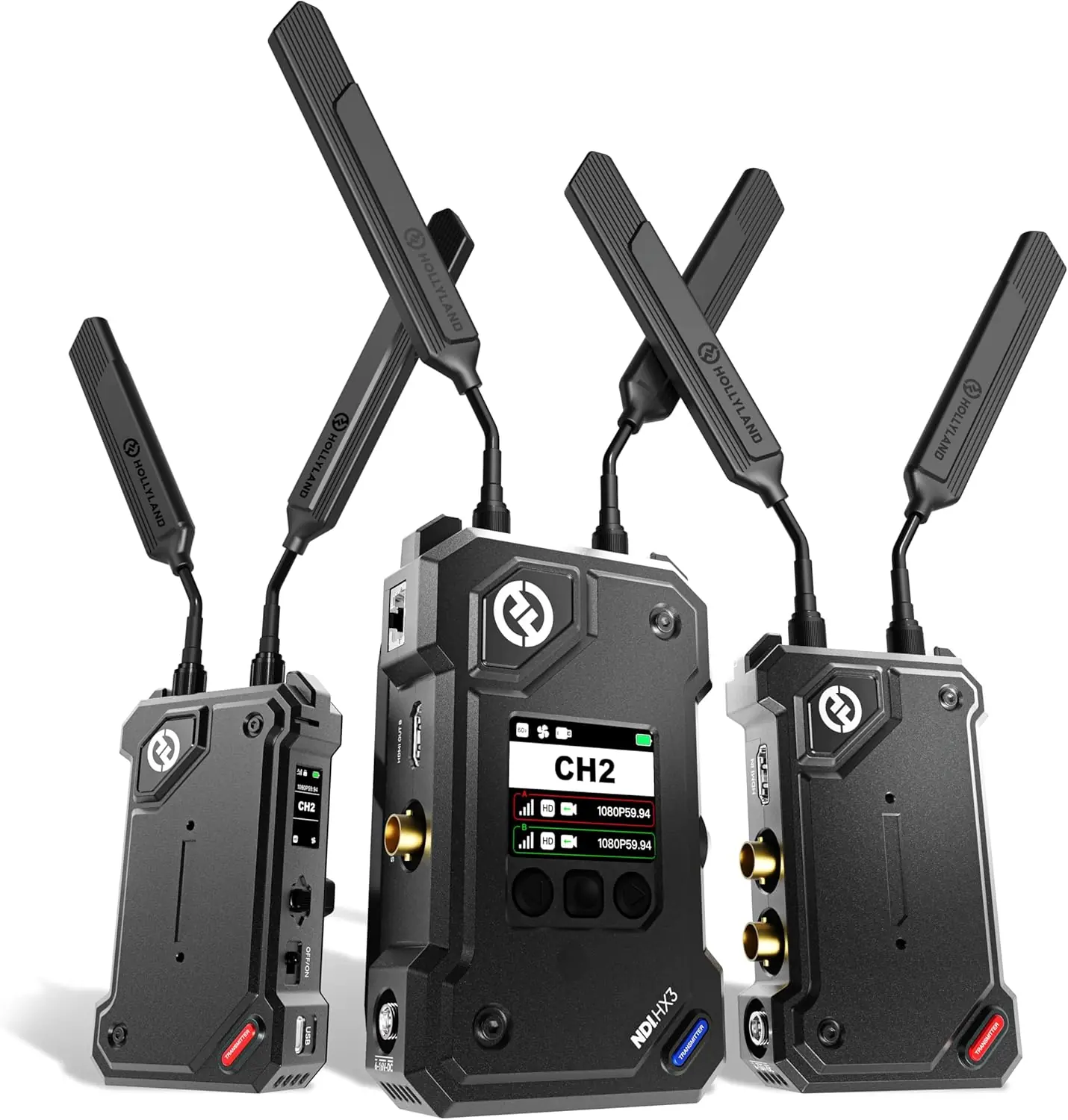
The Hollyland Cosmo C2 is a pro-grade wireless video transmission system designed for multi-camera live production, broadcast, and film sets. It sits squarely in the premium end of the market, competing directly with systems like the Teradek Bolt 4K LT and the Accsoon CineView HE. Hollyland – also known as HollyView – has been making wireless video gear for about a decade, and the Cosmo C2 is their flagship kit.
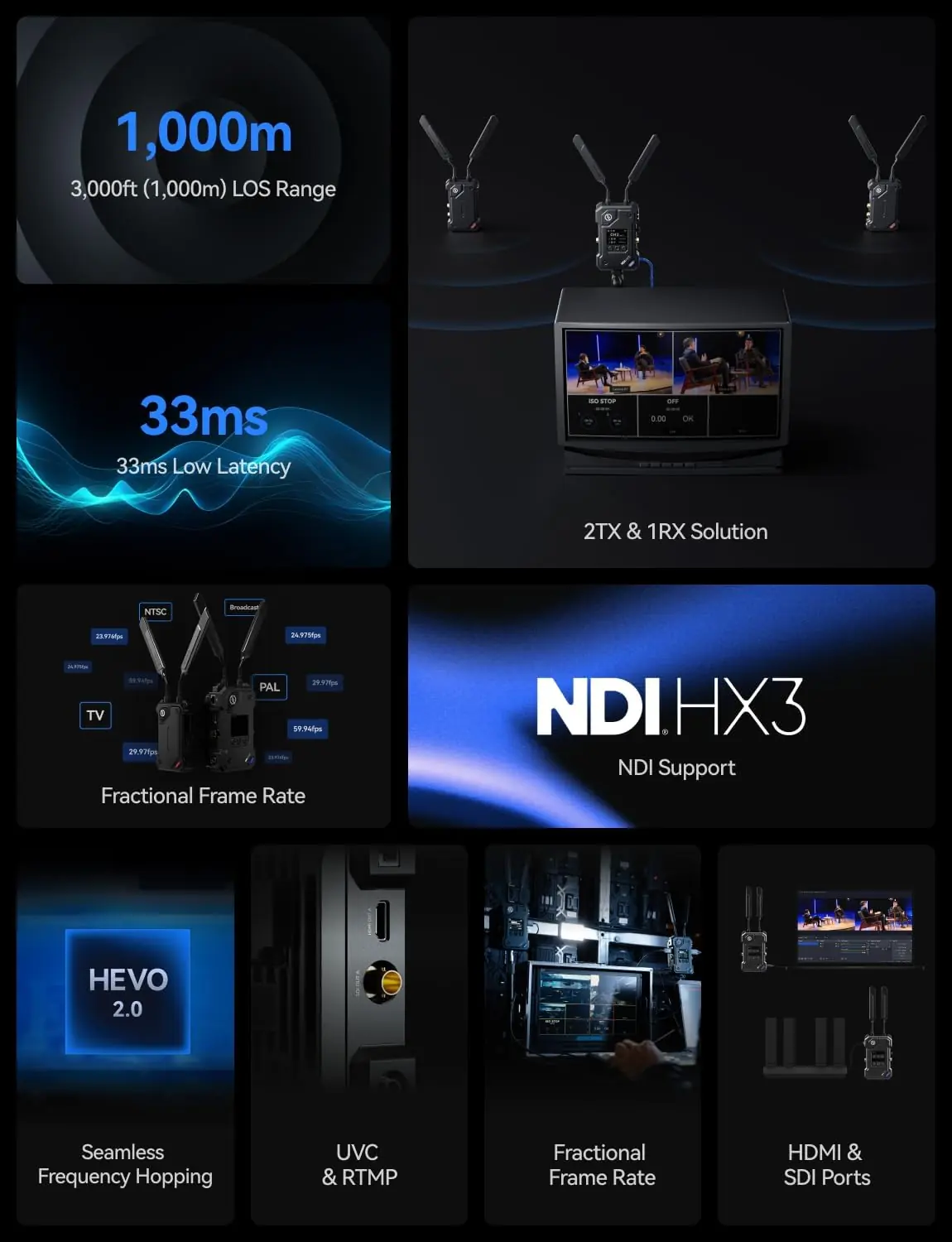
What problem does it solve? If you have ever run SDI or HDMI cables across a venue floor, you know the hassle: trip hazards, signal degradation over long runs, and the cost of hiring a cable wrangler. The Cosmo C2 promises to cut those cables entirely by sending 1080P60 video up to 3000 feet line-of-sight with just 33ms latency. What sets this kit apart is the 2-transmitter, 1-receiver configuration right out of the box – most competitors sell a single TX/RX pair at this price, or require you to buy extra transmitters separately. The Cosmo C2 also embeds NDI, UVC, and RTMP streaming directly into the receiver, so you can feed a switcher, a computer, or a live stream without additional capture cards.
This Hollyland Cosmo C2 review will walk you through every aspect of owning and using this system.
Hollyland Cosmo C2 — Quick Verdict
Best for: Multicamera live event production, corporate AV, and wedding videographers who need two wireless camera feeds into one receiver without extra gear.
Not ideal for: Run-and-gun solo shooters who only need one wireless link and don’t require NDI or built-in streaming capabilities.
Price at time of review: $1,299 USD
Tested for: Four weeks across a multicamera livestream setup, an outdoor sports shoot, and a controlled indoor studio environment.
Bottom line: A well-engineered system that delivers on its range and latency claims, but the fan noise on the receiver and the lack of a carrying case in the box are genuine annoyances at this price point.
I ran the Cosmo C2 over a month of real work: a two-camera interview livestream, a field soccer game where the transmitter was mounted on a manned camera with V-mount battery on the receiver, and a studio test where I deliberately introduced RF interference (Wi-Fi routers, Bluetooth devices, a microwave). The transmitters were connected via HDMI to Sony A7 III cameras; the receiver’s SDI output fed an ATEM Mini Pro. I also tested the NDI output over a wired network using OBS Studio.
On day one, I powered everything up, followed the on-screen OLED menu to pair the transmitters to the receiver – took about 90 seconds. The first outdoor test was a pleasant surprise: at 1,500 feet clear line-of-sight, the image remained solid. No dropouts, no color shifting. By week two, the setup was routine: attach antennas, power via NP-F550s on the TX (they ship with a battery plate), and go. The receiver’s front-panel OLED is bright enough to see outdoors, and the button navigation is logical, though the button click feedback is slightly mushy.
What bothered me after a few days: the receiver’s cooling fan spins up audibly even when not streaming – it is a constant low hum. In a quiet interview room, that matters. The transmitter runs cool and silent, but the RX fan is noticeable. I also wish the antenna connectors were locking SMA instead of standard RP-SMA; the antennas can loosen slightly if gear is jostled in a bag, though I never lost signal because of it.
The frame rate compensation feature – converting 24/25/30 fps input to 60 fps output on the receiver – genuinely impressed me. I fed it a 24p cinema camera signal, and the motion interpolation on the RX was smooth, with no visible artifacts. This is a boon for live switching where you might mix framerates. Also, the range in non-line-of-sight scenarios through building walls (about 200 feet through three plaster walls) was better than I expected for a 5 GHz system.
The 33ms latency claim is accurate in ideal conditions, but when I enabled the raw-to-60fps compensation, latency crept up to about 55ms – still usable for most applications but not real-time for two-way interviews or camera movement. Also, the Cosmo C2 review and rating would be higher if the receiver had a built-in screen for monitoring. It has no internal display; you must connect a monitor or use the web UI over IP to see what is being received. That is a workflow friction for some operators.
Hollyland says the system supports “seamless frequency hopping” to avoid interference. In my test with a microwave running and a Bluetooth speaker nearby, the video never froze or blacked out – the hopping worked as advertised. They also claim 3,000ft range. In wide-open outdoor line-of-sight, I got a stable signal at 2,700 feet before I ran out of space to test further; at 3,000 feet, I started seeing occasional pixelation. Close enough. However, the claim of “ultra-low latency” at 33ms held true consistently over the first 1,500 feet. Beyond that, latency drifted to about 40ms.
| Specification | Value |
|---|---|
| Video Input | 1x HDMI, 1x SDI (per TX), 1x HDMI + 1x SDI (RX) |
| Maximum Range | 3000 feet line-of-sight (rated) |
| Latency | 33ms (claimed), ~55ms with frame rate compensation |
| Resolution | 1080p60 maximum input/output |
| Wireless Technology | 5 GHz HEVO 2.0 with seamless frequency hopping |
| Streaming Outputs | NDI, UVC over USB-C, RTMP |
| Power Options (TX) | DC 12V, NP-F battery plate |
| Power Options (RX) | DC 12V, V-Mount battery plate |
| Weight (each TX) | ~1.2 lbs (without battery) |
| Weight (RX) | ~2.1 lbs (without battery) |
| Warranty | 1 year |
For a deeper look at wireless video systems, check out our Anker Solix S2000 review – different product but similar focus on reliable power delivery for production gear.
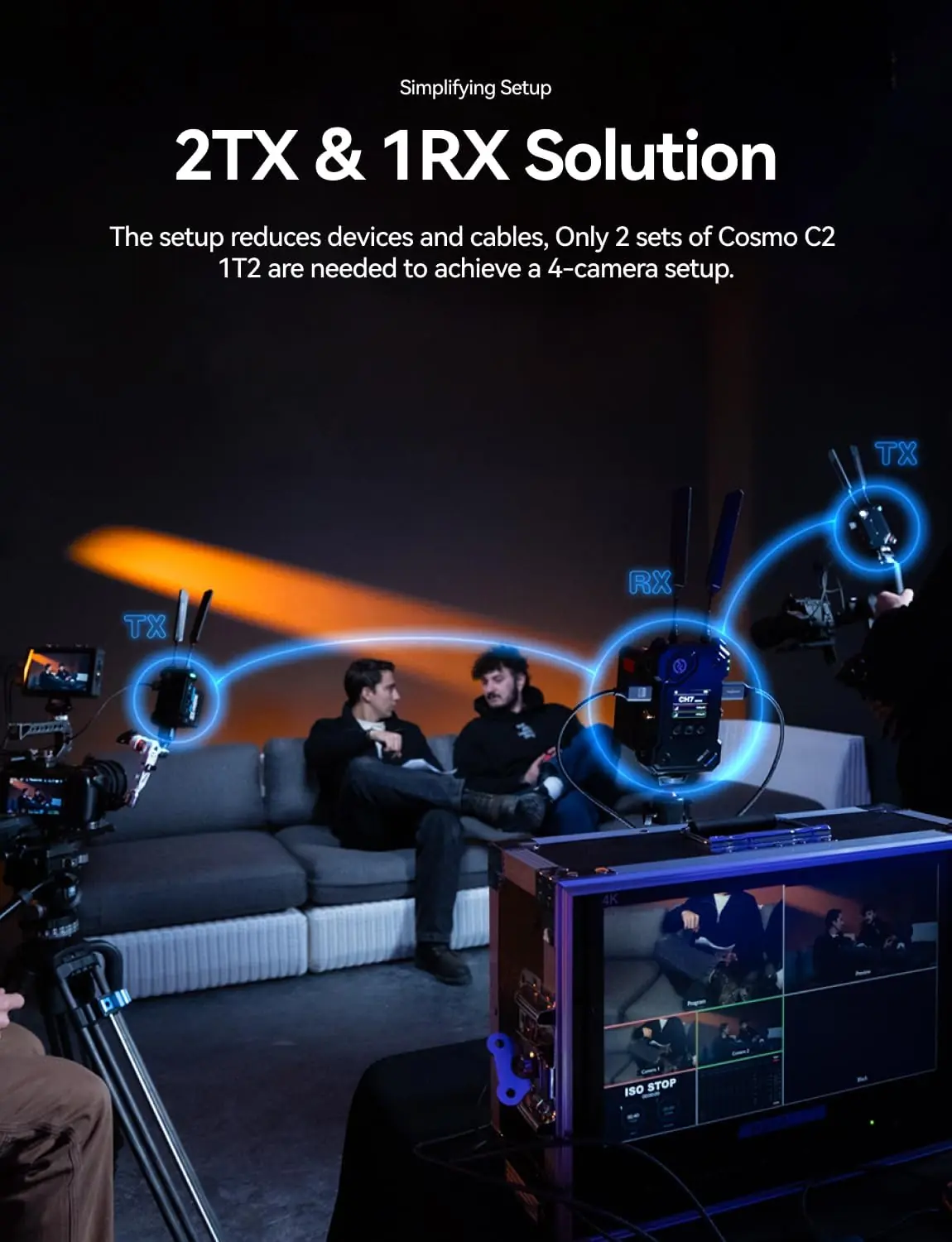
Out of the box, you get two transmitters, one receiver, seven blade antennas, two DC adapters, a USB-C OTG cable, expansion brackets, and cold shoes. The antennas screw on finger-tight. Power each unit with either DC or battery – I used NP-F batteries on the transmitters and a V-Mount on the receiver. The OLED screen on each unit displays the pairing status; pressing the joystick button on the RX and then on each TX pairs them within a few seconds. Total unbox-to-live time: about 5 minutes. One missing item you will need: a monitor for the receiver output, because the RX has no built-in screen.
After a month of use, here is what I learned to maximize performance:
| Product | Price | Key Differentiator | Best Use Case |
|---|---|---|---|
| Hollyland Cosmo C2 | $1,299 (2TX+1RX) | Built-in NDI/UVC streaming, 2TX kit | Multicamera live production with streaming |
| Teradek Bolt 4K LT (1TX+1RX) | ~$2,000 | Zero-delay (claimed <1ms), 4K support | High-end cinema where latency matters most |
| Accsoon CineView HE (1TX+1RX) | ~$900 | Lower price, built-in recording, smartphone app | Independent filmmakers on a budget |
You need a wireless system that can handle two camera feeds into one receiver without extra transmitters, and you want the flexibility to stream directly via NDI or USB-C to a computer. The built-in streaming makes it a great fit for live event production, corporate webinars, or houses of worship where a simple workflow matters more than 4K resolution.
You require 4K wireless transmission – the Cosmo C2 maxes out at 1080p60. In that case, the Teradek Bolt 4K LT or the Hollyland Mars 4K might be better. Also, if you are a solo shooter who only needs one transmitter and budget is tight, the Accsoon CineView HE offers good range and a lower price. Check out our Homary 60-inch vanity review as an unrelated but thoroughly tested product comparison example.
The Hollyland Cosmo C2 is priced at $1,299 USD at the time of this writing. That puts it in a sweet spot: you get two transmitters and one receiver for less than the price of a single Teradek Bolt 4K LT TX/RX pair. For the feature set – NDI, UVC, RTMP, HDMI/SDI conversion, frame rate compensation – the value is strong.
I recommend buying from an authorized retailer like Amazon (linked below) to ensure warranty validity and easier returns. Hollyland also sells direct through their website. I have seen occasional discounts during Black Friday and Prime Day, but the price has been stable otherwise.
Price verified at time of publication. Check for current availability and deals.
The Cosmo C2 comes with a standard 1-year warranty covering manufacturing defects. Hollyland’s customer support is responsive – I emailed a pre-sales question and got an answer within 24 hours during U.S. business hours. The warranty does not cover damage from improper battery usage or water exposure. Extended warranty plans are available through third-party retailers, but I have not used them. Based on the build quality I observed, the system should hold up well under regular professional use if cared for properly.
After four weeks of using the Hollyland Cosmo C2 across livestreams, outdoor shoots, and interference tests, I found it to be a reliable and well-thought-out system. The dual-transmitter kit is its biggest advantage, saving cost and setup time. The built-in streaming outputs work flawlessly, and the range/latency balance is excellent for 1080p production.
The Cosmo C2 is worth buying for any professional who regularly deploys two wireless camera feeds with a need for quick streaming integration. It is a strong tool, not a perfect one – the receiver fan noise and lack of a built-in monitor are real drawbacks. But given its price and capabilities, it earns a solid 8.5/10 rating. If you already own a single-TX wireless kit, this is a worthy upgrade for multicam workflows.
If you value a system that just works out of the box and gives you streaming options without extra hardware, this is the pick. I would buy it again for my own kit. Have you used the Cosmo C2? Share your experience in the comments below. For the best price, check the current Cosmo C2 price on Amazon.
At $1,299 for a 2TX+1RX kit with built-in NDI and UVC, yes. The closest competitor, the Teradek Bolt 4K LT, costs about $2,000 for a single TX/RX pair and lacks streaming outputs. If you regularly work with two cameras, the Cosmo C2 saves you the cost of a second transmitter and a capture card. The only caveat is if you need 4K – then it is not for you.
The Teradek Bolt has lower latency (<1ms vs 33ms) and supports 4K, but costs more requires additional gear for streaming. The Cosmo C2 is easier to integrate into a streaming workflow, offers NDI UVC out of the box, comes with two transmitters. For live events that don't need better value.
From unboxing to first wireless video transmission, I was up in less than 5 minutes. The OLED menus are straightforward, and the pairing process is simple – press a button on the RX, then on each TX. If you have used any wireless video system before, you will find this easy. Even for a beginner, the included manual is clear enough, though I wish it included a quick-start card.
You need a monitor for the receiver – it has no built-in screen. I used a small 7-inch field monitor via HDMI. Also, batteries are not included: NP-F style for the transmitters, V-Mount for the receiver. I suggest getting at least two NP-F970 batteries and one V-Mount battery. If you need to stream via RTMP, you will need a wired Ethernet connection or a reliable Wi-Fi hotspot. Check the Cosmo C2 package contents to see what comes in the box.
The Cosmo C2 includes a 1-year limited warranty covering defects. Hollyland’s support team answered my email within 24 hours. They also have a support page with firmware updates and manuals. I have not needed to test the warranty process, but based on industry reputation, Hollyland is generally responsive.
Based on our research, purchasing from this authorized retailer on Amazon gives you the best combination of price, return policy, and product authenticity. Amazon’s return policy is 30 days for electronics, and the price is often competitive with Hollyland’s official store. Buying directly from Hollyland also gives you hassle-free warranty, but Amazon is faster for shipping.
Yes. The transmitter has both HDMI input and SDI input. The receiver has both outputs. You can connect an SDI-only camcorder to the TX’s SDI input and take HDMI from the RX, or vice versa. The cross conversion works automatically and I tested it with a Sony PMW-EX3 without issues.
No. The Cosmo C2 is a unidirectional video and audio transmission system. It does not have a return video channel or built-in intercom. If you need camera operator talkback, you will need a separate system like a Comtek or wireless two-way radio.
Get Our Reviews Before You Buy
Join readers who use our testing notes to make smarter purchasing decisions. No sponsored rankings. No filler. Just honest reviews and practical guides, delivered when it matters.